
Nissan Juke 2023 Owners Manual
4.3.1. Operation
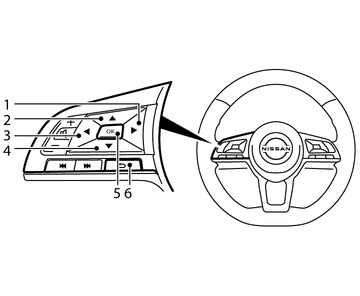
- 1
 button
 - 2
 button
 - 3
 button
 - 4
 button
 - 5<OK> button
- 6
 (Back) button
Arrow buttons:
Press the or button on the steering wheel to change between the available Vehicle Information Display screens.
and buttons:
Press to scroll up or to scroll down through the items in the Vehicle Information Display.
<OK> button:
Press the <OK> button on the steering wheel to select a menu function, confirm a selection, or toggle a setting.
 button:
Press the (BACK) button to return to the previous display screen or menu level, or to cancel the selection if it is not completed.
Owners Manual