
Nissan Qashqai 2026 Owners Manual
4.8.1.3. Autolight system (<AUTO> — where fitted)
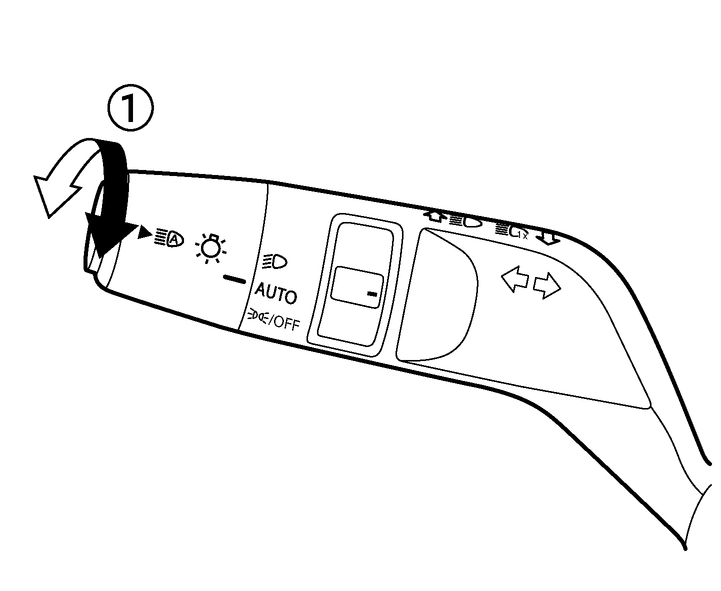
The autolight system allows the headlights to be set so they turn on and off automatically. When active, the autolight system will:
Turn on the headlights, front side, tail, number plate and instrument panel lights automatically when it gets dark.
Turn off all the lights except the daytime running lights and tail lights when it gets light.
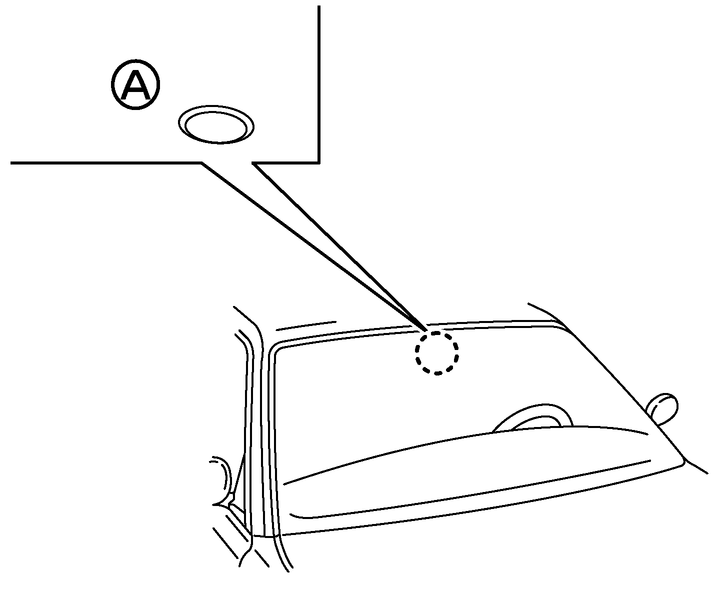

Be sure not to put anything on top of the photo sensor (A) located at the top centre of the windscreen. The photo sensor controls the autolight system; if it is covered, the photo sensor reacts as if it is dark and the headlights will illuminate.
To activate the autolight system
Turn the headlight switch to the <AUTO> position (1).
Switch the ignition ON.
To disable the autolight system
Turn the switch to the  /OFF, or
  position.
Owners Manual