
Nissan ARIYA 2025 Owners Manual
9.17.1. Display and indicators
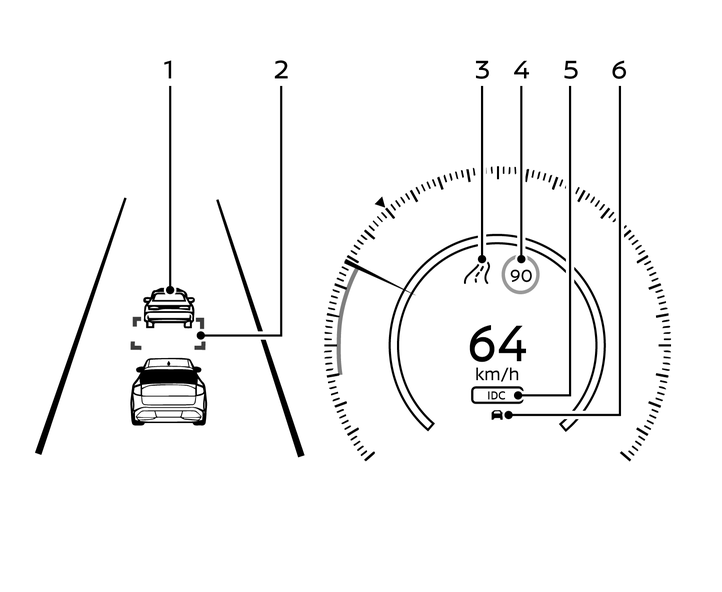
Vehicle ahead detection indicator
Displays whether the system detects a vehicle in front of you (only when IDC is active)
Distance control vehicle marker
The distance control target vehicle is indicated with the green marker displayed below the vehicle.
Road information indicator (where fitted) (
 ,
 ,
 ,
 ,
 )
Indicates the detected road information
Detected road sign (speed limit) indicator (where fitted) (
 )
Indicates the currently detected speed limit
Intelligent Distance Control (IDC) indicator (
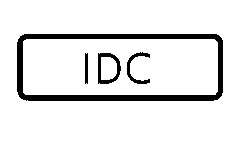 )
Indicator (green): IDC is active
Indicator (white): IDC is enabled (standby)
Intelligent Distance control (IDC) status indicator (
 )
Displays the status of the IDC by the colour of the indicator
White: IDC standby
White vehicle icon displayed: Vehicle detected ahead
No vehicle icon shown: No vehicle detected ahead
Indicator (green): IDC is active
Indicator (yellow): Indicates an IDC malfunction
Information related to this system is also shown in the Head Up Display (HUD) (where fitted). (See .
)