
Nissan ARIYA 2025 Owners Manual
3.2.3.2. Li-ion battery heater
When the Li-ion battery temperature becomes lower, it can cause longer charging time by the quick charger/fast charger.
The Li-ion battery heater will automatically turn on when the Li-ion battery temperature is cold during quick charging/fast charging. It will also turn on while driving, if the function is enabled on the touch screen display. It will raise the Li-ion battery temperature to avoid extending charging time when using the quick charger/fast charger.
When the Li-ion battery heater operates while quick charging/fast charging, it uses electrical power from the quick charger/fast charger.
The improvement of charging capacity varies depending on the temperature and/or state of charge of the Li-ion battery.
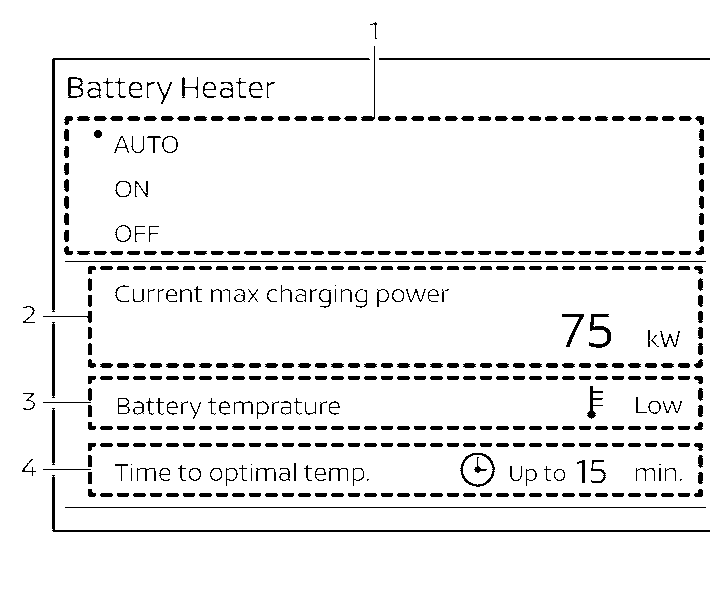
[Battery Heater] [AUTO]
[Battery Heater] [ON]
[Battery Heater] [OFF]
[Current max charging power]
Indicates the approximate maximum charging power.
"--kW" will be displayed when charging is not possible.
(Charging is not possible when the state of charge is 100%)
[Battery temperature]
Indicates the current Li-ion battery temperature.
[Low]: Battery temperature is low. It is recommended to turn ON the battery heater before the quick charger/fast charger.
[Optimal]: Battery temperature is reached to the optimal temperature for charging.
(non display): Battery temperature is already high enough for charging.
[Time to optimal temp.]
Indicates the approximate time it will take to reach the optimal battery temperature when the battery heater is activated. The time shown may vary depending on outside temperature and driving conditions, etc.
If the battery temperature is optimal or high enough already, this will not be displayed.
2 and 4 above will not be displayed while charging.
3 and 4 above will not be displayed when the [Battery Heater] [AUTO] is selected.
[Battery Heater] [ON]
To allow the Li-ion battery heater to operate while driving, enable the function on the touch screen display.

When the Li-ion battery heater operates while driving, more electric power will be consumed than in normal driving condition, which could result in a decreased energy economy and driving range. Take account of state of charge of the Li-ion battery and estimated driving range while driving.
When use of the battery heater is recommended, the battery temperature on the Battery heater switch screen indicates [Low].
The current maximum charging power is also shown on the screen. If the current maximum charging power is lower than the charging power of the quick charger/fast charger at your destination, it is recommended to turn the battery heater on.
The time it takes for the battery heater to reach the optimal temperature for charging is also displayed on the screen. Refer to the displayed time, you can turn on the battery heater before arriving at a quick charging/fast charging station.
The time it takes for the battery to reach the optimal temperature for charging is an estimate only, and may vary depending on the outside temperature and driving conditions, etc.
When the Battery Heater [ON] is selected, the setting will be turned to [OFF] or [AUTO] automatically depending on the condition when the quick charging/fast charging is completed or the power switch is placed in the OFF position.
[Battery Heater] [AUTO]
When the [Battery Heater] [AUTO] is chosen, based on the quick charger/fast charger information (charger output, travel time required to a quick charger/fast charger) set by the navigation system, the battery is warmed at the optimal temperature and timing for quick charging/fast charging, which reduces the quick charging/fast charging time with wastefree heater power consumption.
When the function is activated, the Battery Temperature Management Indicator will appear on the Electric Vehicle screen and the "Electric Vehicle" widget.
This function can be activated only during route guidance with the navigation system. To enable the function, select [AUTO] on the battery heater in thenavigation system setup screen.
When the Battery Heater operates while driving, more electric power will be consumed than in normal driving condition, which could result in a decreased energy economy and driving range. Take account of state of charge of the Li-ion battery and estimated driving.
If the travel time to the quick charger/fast charger is short, the battery temperature may not rise sufficiently and charging performance may not improve.
This function may continue if you cancel the route guidance immediately after setting a route including the quick charger/fast charger in the navigation system, but this function will be deactivated after a certain amount of driving.
If you cancel the route guidance before arriving at a quick charger/fast charger this function will be deactivated. In addition, if the route guidance is cancelled near a quick charger/fast charger, this function will be continued until a quick charging/fast charging is performed or a certain distance away from the charging point. If you do not need the battery heating, turn it off with the battery heater screen.
If a transit point (other than quick charger/fast charger) is added before arriving at a quick charger/fast charger, this function will not be activated until the vehicle has passed the transit point.
Even during the navigation system route guidance, the heater may not be activated in the following cases.
Li-ion battery state of charge is low.
If the quick charger/fast charger output is low or predicted state of charge value at the arrival to a quick charger/fast charger is high.
Li-ion battery heater icon
When the Li-ion battery heater is activated, the Battery Temperature Management Indicator will appear on the Electric Vehicle screen and the "Electric Vehicle" widget.
 : Battery temperature is being optimised for your route.
 : Automatically preheating the battery to optimise fast charging for your route.
 : Battery heater active (turned ON by the user or automatically during charging when the battery is cold).
Battery Temperature Management
When driving to the destination with the guidance of the navigation system, the driving load is predicted from the route information, and the Li-ion battery temperature is controlled, contributing to the improvement of the quick charging/fast charging speed.
This function is automatically enabled during route guidance by the navigation system. When the function is activated, the Battery Temperature Management Indicator “ " appears on the Electric Vehicle screen and the "Electric Vehicle" widget.
Even during the navigation system route guidance, this function may not be enabled in the following cases.
When you deviate from the route guided by the navigation system.
When the GPS reception is poor.
When a quick charger/fast charger has been set as a transit point, the time between the stop of route guidance after arriving at a quick charger/fast charger and the "Continue" key on the navigation system.