
Nissan ARIYA 2025 Owners Manual
9.17.3.4. Navi Link (where fitted)
Listed below are the system limitations for the Navi Link. Failure to operate the vehicle in accordance with these system limitations could result in serious injury or death:
There are limitations to the Navi Link system capability. The system does not function in all driving, traffic, weather and road conditions. It is the driver’s responsibility to stay alert, drive safely, and be in control of the vehicle at all times.
The Navi Link system does not brake the vehicle to a stop. Whenever necessary, the driver must apply appropriate braking.
It is the driver’s responsibility to select the proper speed, follow all traffic regulations and observe other road users.
The availability of the Navi Link system is country-dependent. In some countries, for example, Iceland, Malta, Cyprus, this function is not available. The map data quality does not satisfy the system requirements. If the system detects that the vehicle is located in these countries on the basis of GPS information, the system prohibits activation of the Navi Link function.
The Navi Link may not operate properly in some road and traffic conditions, the system may unexpectedly change the speed. The driver must manually control the vehicle speed.
Below are some examples:
When driving in countries or areas not covered by the navigation system.
When the data from the navigation system is not up-to-date or is unavailable.
When the navigation system is recalculating the route.
When driving on a road under construction or newly constructed road.
When driving near a road split or junction.
When driving in bad weather or poor road conditions.
When the camera cannot correctly detect the lanes.
When the navigation system cannot connect to the server to get map information.
When the software license for the navigation system has expired.
When the IDC system is active and the driver releases the accelerator pedal, the Navi Link uses road information provided by the navigation system to assist the driver in reducing vehicle speed depending on the following situations:
Curves
Motorway exits
Roundabouts
T-Junctions
Also, the Navi-link assists the driver in reducing vehicle speed when the turn signal indicator is turned on and the following situation is detected:
Turning off at junctions
The system may not always reduce speed for all curves, exits, roundabouts, X/T-junctions, or side-turns, and the driver may need to apply additional braking at any time.

The system does not operate when the accelerator pedal is depressed.
System display and indicators
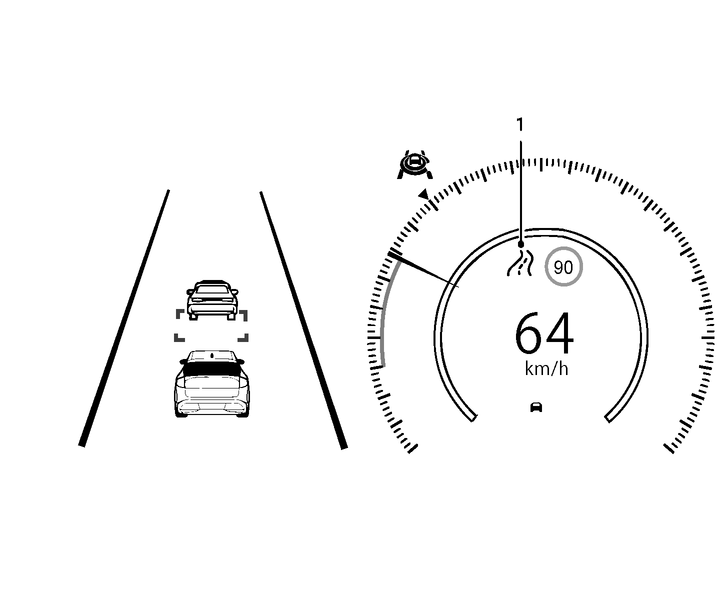
Road information indicator
Appears when the system adjusts the speed depending on turns or exits.
| Curves and junctions |
| Right exits |
| Left exits |
| Roundabouts |
| T-junctions |
| X-junctions and side-turns |




How to activate or deactivate the system
Push the

 button on the steering wheel until [Settings] appears in the vehicle information display, and push the scroll dial.
Use the scroll dial to select [Driver Assistance]. Then push the scroll dial.
Select [Forward Assist] and push the scroll dial.
Select [Navi Link] and push the scroll dial to turn the system on or off.
The system will retain current settings in the vehicle information display even if the EV system is restarted.