
Nissan ARIYA 2025 Owners Manual
8.9.6.1. How to set Climate schedule
The Climate schedule settings can be changed with the touch screen display.
Touch the "
 " key on the touch screen display.
Touch the "
 " key and then touch [Electric Vehicle] key.
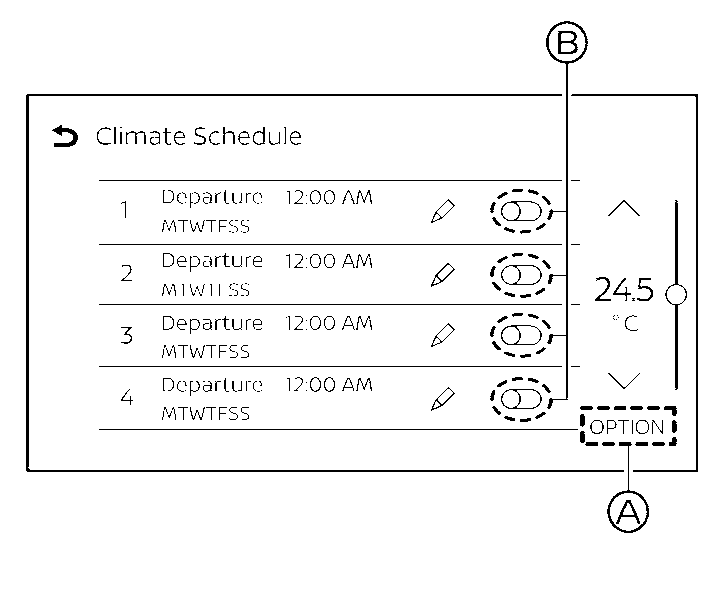
Touch the [Climate schedule] key. Climate schedule screen is displayed.
Available setting items:
Temperature
Touch the temperature control key to adjust the temperature.
Timer settings
Touch (B) to turn on/off the timer. The indicator light will turn on when the timer setting is turned on.
"
 " key
Touch to display the Climate schedule setting screen. Set preferred time and day of the week for Climate Schedule activation.
After completing the settings, place the power switch in the OFF position, and then connect the charge connector to the vehicle.
Touch [OPTION] (A) to set the ECO Climate schedule.
When this setting is on, only the heated steering wheel (where fitted) and heated seats (where fitted) will be used with the climate schedule. This allows less use of the battery for climate schedules.
Climate schedule setting screen
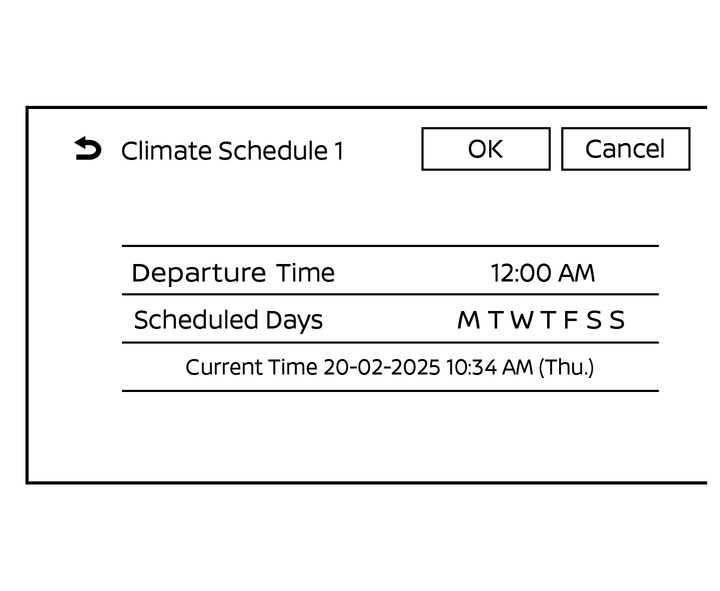
Touch [Departure Time] key to set the departure time.
Touch [Scheduled Days] key and select the days of the week you wish to activate the Climate schedule.
Touch [OK] key to save the setting.

The Climate schedule operates repeatedly once it is turned on.
Operating tips for using Climate schedule
The Climate schedule will only start when the power switch is in the OFF or Auto ACC position.
To turn off the Climate schedule function, touch (B) key to turn the indicator light off. The departure time settings will not be deleted even if the Climate schedule function is turned off.
If the Climate schedule starts operating while the vehicle is being charged, the time required for charging will be longer.
Operating the Climate schedule in an environment where the temperature is low may decrease the rate of battery charge.
Timer setting can also be changed while Climate schedule is operated. When the power switch is in the OFF position, the heater and air conditioner system starts or enters waiting mode depending on the new timer settings.
When the difference in temperature between the Climate schedule setting temperature and the temperature outside the vehicle is large, the temperature inside the vehicle may not be maintained at the setting temperature.
The temperature in the passenger compartment may not be comfortable if entering the vehicle too soon before or too long after the scheduled time of departure.
The heater and air conditioner system operation is limited to the capacity of the electric power when the charge connector is connected to the vehicle. Therefore, the temperature may not reach the set temperature due to limitations in heater and air conditioner system performance, if ambient temperature is excessively high or low.
The Climate schedule operates the heater and air conditioner system function so that a comfortable temperature is provided in the passenger compartment at the scheduled time of departure. The heater and air conditioner system is set to stop at the scheduled time of departure.
Depending on the facilities of charging station, there may be time when it is not available for charging. Confirm the availability of the charging facility before setting the Climate schedule. Be sure that the power switch of the charger is turned on when setting the Climate schedule.
When the power switch is placed in the OFF position after changing the setting, the new setting will be applied.
The ECO climate schedule function is unavailable if the vehicle does not have heated seats, ventilation seats, or a heated steering wheel.